
Document level scripts are used to add functions from which other scripts can reuse routines throughout a PDF file. You can also use document level JavaScripts to invoke actions when a file opens.
To write a document level JavaScript
- Open the PDF in Nitro PDF Pro
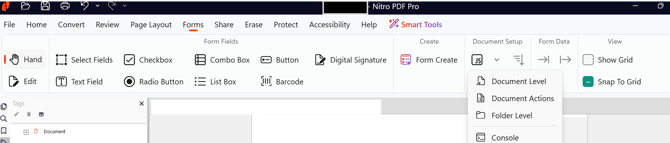
- On the Forms ribbon, in the Document Setup group, click the arrow besides the JavaScript button and then click Document Level
- Click New, and type a name for the JavaScript
- In the JavaScript Editor dialog, enter your code. In the example below, a simple routine is created that opens an alert dialog box each time the file opens The code used is:
var msg = "Created in Nitro PDF Pro";app.alert(msg); - Click OK. If your script was written properly, a dialog box should display each time the file is opened.
Last updated: June 2026