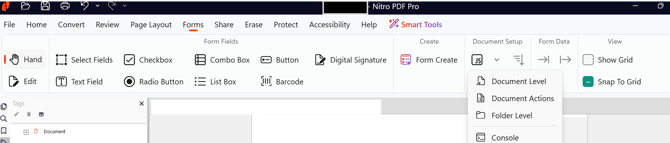
Folder level JavaScripts are JavaScript files (.JS) that are run during application startup. These can be useful for loading reusable JavaScript functions into the application, or accessing methods/properties whose security restrictions only allow them to be run in the app/init event.
Simple examples include loading the user’s Windows login into a global JavaScript variable at startup, or loading a list of employee names from your company into a JS array at startup which can be used by the forms that are opened in Nitro PDF Pro.
To add or edit a folder level JavaScript
Open Nitro PDF Pro
On the Forms ribbon, in the Document Setup group, click on the arrow next to JavaScript and then select Folder Level
Add JS files to the folder or edit existing ones
Last updated: June 2026
Last updated: July 30, 2026
Was this article helpful?
Thanks for your feedback. We're glad we could help.
Thank you. Your feedback will be used to make future improvements.
Thanks for your interest in Nitro!
For those requiring fewer than 20 licenses, our online store is the fastest way to access the same trusted Nitro PDF tools—optimized for simplicity, security, and speed.
Recommended plans for you:
Nitro PDF Standard
For Windows, Mac, and iOS
For individuals, small teams, and businesses seeking a full suite of PDF editing tools to boost productivity and streamline workflows.