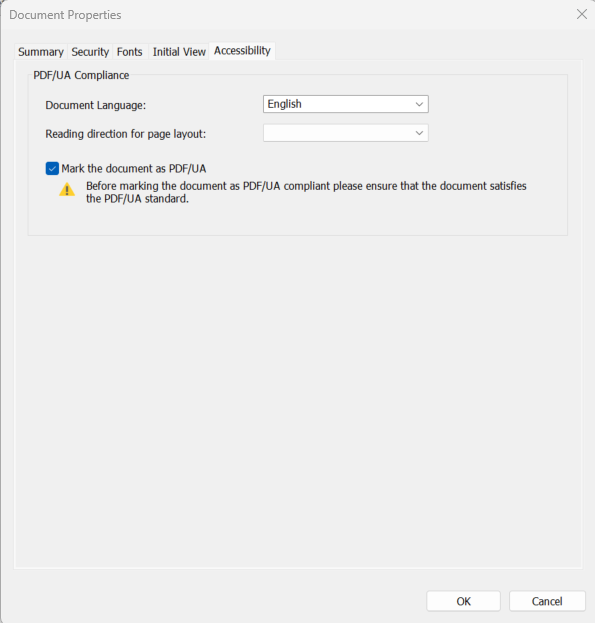
Zodra u klaar bent met het toegankelijk maken van uw PDF-document, voert u een controle uit op de naleving van de PDF/Universal Accessibility (PDF/UA)-standaard met behulp van een willekeurige PDF-validator. Als uw PDF-document de controle heeft doorstaan en aan alle vereiste toegankelijkheidscriteria voldoet, kunt u het markeren als PDF/UA-conform.
Een document markeren als PDF/UA-conform
Open je PDF-document met Nitro PDF Pro
Selecteer Bestand > Documenteigenschappen > Toegankelijkheid
Schakel het selectievakje 'Het document markeren als PDF/UA-conform' in
Klik op OK
Klik op ‘Opslaan’ in de bovenste balk of druk op Ctrl+S op je toetsenbord om je wijzigingen op te slaan
Laatst bijgewerkt: juni 2026
Last updated: juli 30, 2026
Was this article helpful?
Thanks for your feedback. We're glad we could help.
Thank you. Your feedback will be used to make future improvements.
Thanks for your interest in Nitro!
For those requiring fewer than 20 licenses, our online store is the fastest way to access the same trusted Nitro PDF tools—optimized for simplicity, security, and speed.
Recommended plans for you:
Nitro PDF Standard
For Windows, Mac, and iOS
For individuals, small teams, and businesses seeking a full suite of PDF editing tools to boost productivity and streamline workflows.